Class 3 - Revisions and the Cloud
Lab 3 - Revisions and the Cloud
Setup and Requirements
- Clone down reading-notes repo to local computer to work in VS Code
- Continue Markdown practice
- Review past reading-notes entries and correct and fix typos
- Build out site structure by creating new directory for 102 notes with 8 files and 201 notes with 15 files
- Ensure homepage only has intro, website description, and table of contents
- Use Markdown to create a link from the Table of Contents to the topic’s page
- Heading for Code 102 Reading Notes, 8 links to current and future 102 Reading notes
- Heading for Code 201 Reading Notes, 15 links to future 201 Reading notes
- Keep a clean git history, write commit messages to explain why your changes were made.
Written Class Notes
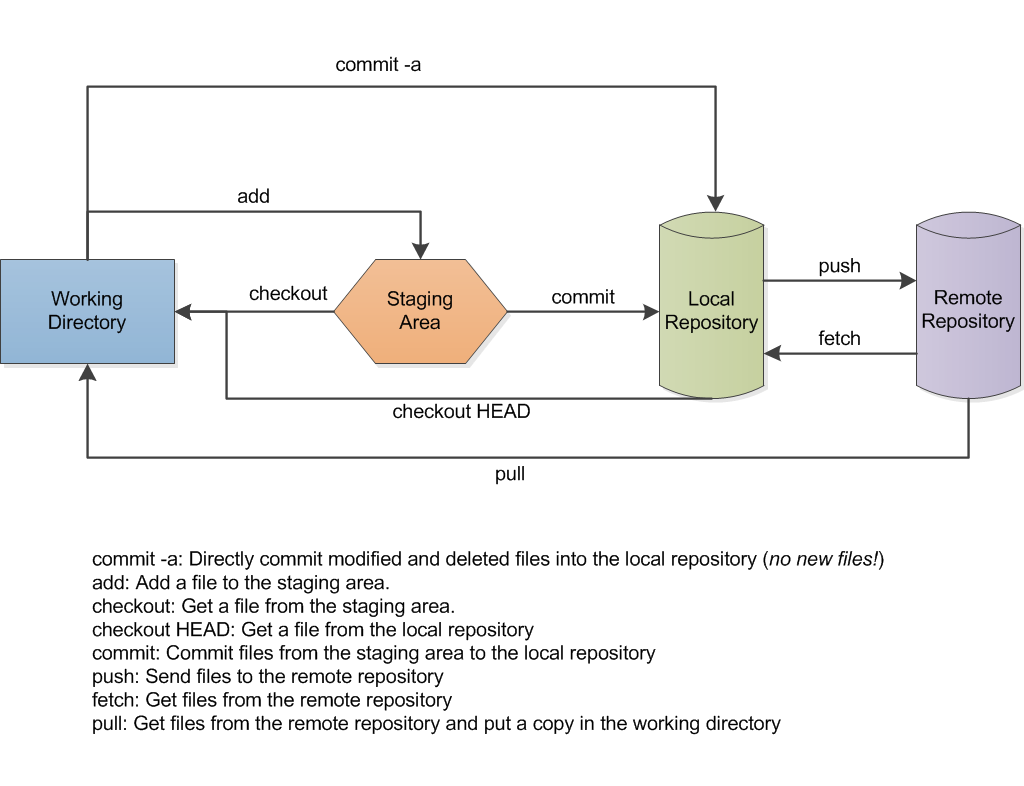
- Git is a version control system, lets multiple people work on the same code, shows history of changes to files and ability to view/apply/remove those changes, and keeps all project files in one repo.
- Commits are snapshots of current progress on file: each snapshot has a label with HEAD = Recent Commit, write commit messages to explain why you made your change
- File on your computer = local repo
- File on GitHub = Remote repo
- Clone from remote to locally: go to repo of GH, click green code button, and copy HTTPS link, in terminal cd to where you want files to live, use
git clone paste link
git remote -v shows where project is connected to- ACP: add, commit, push.
git status shows in termnal what files changed since last commitcode . to open current directory with VS codegit add file name or git add . is telling git what changes we want to commit aka staginggit commit -m "commit message"
git commit Button to take snapshot-m I want to include messagecommit message explain why change is made
- Use
git status red files = need to add changes and git add will turn red to green
- After
git commit there should be no colors saying its ready to push to cloud
- Use
git push origin main to send to GitHub
- Git conflict: try not to make changs on GitHub, data goes one way if VS Code and GitHub are not in sync that is trying to send messages both ways and that doesn’t work
- You can use
git pull origin main instead of push to pull from GitHub first, then terminal will give you choices. Merge is git config pull. rebase false, pull again and choose to accept both or pick one in VS Code.
- Whenever you push changes, the published site will update this is called deployment
Read 3 - Revisions and the Cloud Reflection and Discussion
Resources Link/Pages:
- Git Intro
Local Version Control: One database on hardrive to store filesCentralized Version Control: Changes and files are stored in a central server that can be accessed by othersDistributed Version Control: Creates mirrored repositories.- Git stores data as snapshots of files
- Files can be
commited (stored in local database), modified (change but not committed), staged (ready for snapshot)
Answer
- What is Version Control?
- A system that allows you to visit previous versions of a file or project and you can track and modify changes.
- What is cloning in Git?
- Copying all versions of all files for a project from remote to locally
- What is the command to track and stage files?
- Use
git add file name for one file or git add . for all files
- What is the command to take a snapshot of your changed files?
- Use
git commit -m “commit message”
- What is the command to send your changed files to Github?